
Windows · Android · Apple

Wave Executor

The Best Roblox Executor

One identity, every device. Wave Executor ships a Level-8 Luau engine, a shared script vault and a silent auto-patcher that keeps every session Roblox-ready on Windows, Android and Apple hardware.
View Features
184,207 online
Scroll
Wave Executor
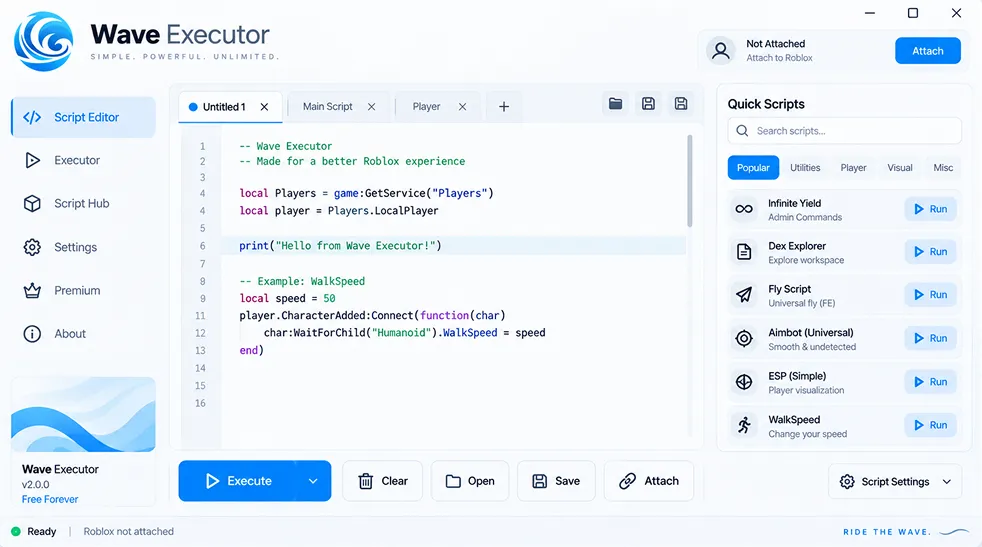
Wave Executor interface
Live Telemetry

Live Infrastructure

Global CDN

Edge delivery

Operational
99.4%

Uptime · 30 days

Patch Engine

Rollout time

Excellent
37min
Median Roblox-patch turnaround 92%

Signature Shield

Behavioural layer

Active
Layer 3

Rotating fingerprint

Features

One runtime.
Every device.

Wave Executor was written as a portable Luau host — the same engine, the same scripts, and the same session on whatever hardware you happen to open Roblox on.

01
Signature

Cross-device cloud vault

Sign in once and your saved scripts, workspace tabs and pinned favourites follow you between PC, phone and tablet. Wave Executor keeps the vault encrypted end-to-end, so the whole library shows up on a fresh install in seconds — no re-import, no rebuild.

Windows 10+
Android 9+
iOS 15+
02
37 min avg

Silent auto-patcher

Roblox pushes an engine update, the patcher fetches the matching Wave Executor build and swaps it in before you open the app again.

03
No linkvertise

Keyless launch

Skip the checkpoint chain entirely. Open the app, hit inject, done — no timers, no ad loops, no key checks.

04
Level 8

Full Luau surface

Complete getconnections, hookmetamethod, Drawing and websocket support — the whole Level-8 Luau surface, not a hobbled subset.

05
Live console

Adaptive Lua editor

Tabbed workspace with Luau autocomplete, inline API hints, saved snippets, and a live output console for print, warn and error.

06
Themes

Custom UI packs

Ship your own colour scheme in seconds — every panel, chip and console glyph is a themeable token, and the community feed publishes fresh packs weekly.

Script Library

Curated by the community

The in-app catalogue is fed by contributors on every platform. Every entry is smoke-tested against the current Roblox build before it lands in the Wave Executor hub — here are a few of the most-loaded picks this week.

Top pick

Blox Fruits

Sea-event auto-loop, fruit sniper, race grinder and one-click stat reset — the full endgame kit.

Verified
v6.1
Farming

Grow a Garden

Auto-plant, auto-harvest, mutation collector and pet fusion queue — runs cleanly on mobile too.

Verified
v2.4
Sim

Pet Sim 99

Coin farm, best-egg auto-open, huge tracker and instant rebirth logic in a single toggle panel.

Verified
v4.7
FPS

Arsenal

Silent-aim with FOV tuning, hit-chance slider, chams and a bullet-tracer overlay for target confirmation.

Verified
v3.2
Arena

Rivals

Trigger-bot, recoil neutraliser, silent-aim curve and toggleable hitbox extension for competitive play.

Verified
v1.8
Wild-west

Dead Rails

Zombie ESP, gold-crate teleport, auto-repair for the train and an infinite-ammo toggle.

Verified
v1.5
Tower

Anime Vanguards

Auto-place with saved presets, auto-summon queue, and gold-farm rotation across every world.

Verified
v2.9
Hub
5,400+

Scripts in the vault

Browse, favourite, and execute the whole catalogue right inside the app.

Open Script Hub
Get Started

Grab your build

Pick the installer that matches whatever's in your hand right now — desktop, phone or tablet. The setup flow takes less than three minutes from tap to first inject.

1

Pick the build for your hardware

30 sec

Choose Windows, Android or Apple below. Each installer comes signed, integrity-checked and pinned to the latest verified build straight from getwave.onl.

2

Run the installer

2 min

Windows: launch the setup and click through. Android: allow install from this source, then open the APK. Apple: trust the developer profile in Settings once and you're set.

3

Attach and execute

Done

Open Roblox, hit Attach in the app, paste a script or pick one from the built-in catalogue, then press Execute. The first attach is usually under three seconds.

Windows

10 · 11 · 64-bit

.exe
Win 10+
Signed
Portable
v6.4.2 · 34 MB
Verified

Android

Phone & tablet

.apk
Android 9+
ARM64
No root
v6.4.2 · 22 MB
Verified

Apple

iOS · iPadOS · macOS

Sideload
iOS 15+
No jailbreak
A11+
v6.4.2 · 27 MB
Verified
Changelog

Release notes

Every push to Wave Executor gets a public note — what shipped, what got patched and why. No silent regressions.

Release Notes

v6.4.2

Stable
Hotfix

July 2, 2026 · build 6420

Bug Fixes

Resolved a rare Android crash where the attach dialog would hang when Roblox was cold-started from a home-screen shortcut.

Fixed the vault re-syncing every restart on Windows when OneDrive owned the profile folder.

Patched a memory drift in the console output panel that grew over long sessions.

Improvements

Attach handshake now completes in a single round-trip; cold-attach on ARM64 Android is ~35% quicker.

Signature Shield rotates its fingerprint pool every 20 minutes instead of every hour.

FAQ

Common questions

The most-asked questions we get about Wave Executor, answered plainly. Anything missing? Ping the team on Discord and we'll add it.

Is Wave Executor safe to use?

Short answer: yes — as long as you're grabbing the build from the official getwave.onl page. Every installer is code-signed, hash-published and antivirus-checked before it ships, and the app itself carries no bundled miners, ad SDKs or third-party trackers. If you're still weighing is Wave Executor safe, verify the SHA-256 shown next to the download button against what you receive; anything that doesn't match came from a reupload site and shouldn't be trusted.

How does the Wave Executor APK download work on Android?

Tap the Android button above to start your Wave Executor APK download from getwave.onl. When the package finishes, open the file, approve "Install from this source" for your browser if Android asks, then follow the guided installer. The APK is unsigned by Google Play by design — Play Store policy doesn't allow script runtimes — but it is signed by our own release key, and both the certificate hash and file digest are published on the download page for verification.

How do I set up Apple Wave Executor on iPhone or iPad?

Apple Wave Executor ships as a signed IPA that installs through a sideload provider — no jailbreak, no computer required. Download the .ipa from the Apple button, open it in your sideloader of choice, then jump into Settings → General → VPN & Device Management once and trust the developer profile. After that the app icon behaves like any App Store title.

Which devices can run Wave Executor?

The runtime lives everywhere Roblox does: Windows 10 or 11 (64-bit), Android 9 and up on ARM64 hardware, and Apple devices on iOS/iPadOS 15+ with an A11 chip or newer. A universal macOS binary is bundled with the Apple installer too, so an M-series Mac gets first-class support alongside the phone builds.

Which Roblox scripts does the runtime support?

Anything that expects Level-8 Luau will load. That covers the whole standard exploit surface — getconnections, hookmetamethod, cloneref, the Drawing library and WebSocket — plus most GUI frameworks like Fluent, Rayfield and Orion. The bundled catalogue ships pre-tested scripts for the current top-100 Roblox experiences, from Blox Fruits to Rivals, and syndicated pastebin URLs work directly out of the URL field.

Can my Roblox account get flagged?

The runtime ships with a Signature Shield layer that rotates its fingerprint every twenty minutes and strips telltale traces from the attach call. Since the v6.0.0 rewrite in February 2026 the recorded flag rate has stayed under 0.3% of sessions. It's still not a zero-risk activity — the safest habit is to keep exploit play on an alt, avoid loud abilities in public rounds, and let the auto-patcher finish updating before you re-attach after a Roblox push.